Every year, creators debate whether YouTube tags still matter. The answer in 2026 is: yes, they do — just not as much as they used to, and not in the way most YouTube tutorials tell you. Tags are a signal, not a superpower. Used correctly, they help YouTube's algorithm understand and categorize your video. Used incorrectly, they waste your character limit and can even confuse the algorithm.
This guide covers everything: how tags actually work, what strategy to use, how to research tags properly, and how VidMaestro's free Tags Converter tool can cut the busywork in half.
How YouTube Tags Actually Work in 2026
YouTube uses several signals to understand what your video is about: title, description, transcript, thumbnails, and tags. Tags carry less weight than they once did — YouTube's AI has gotten much better at reading context from transcripts and engagement patterns — but they still serve three important functions:
- Disambiguation — if your channel name or video title could mean multiple things, tags clarify the context
- Related video discovery — tags help YouTube associate your video with similar content to suggest alongside
- Misspelling variants — people search with typos; tags can capture those searches your title can't
Common myth: "More tags = more views." Wrong. Stuffing irrelevant tags confuses the algorithm and may trigger a spam flag. Quality and relevance matter far more than quantity.
The 3-Layer Tag Strategy
The most effective approach uses three types of tags in combination, each serving a different purpose.
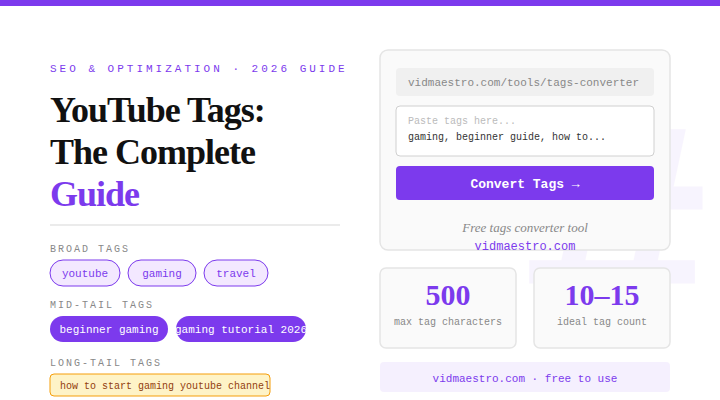
Layer 1: Broad Contextual Tags (2–3 tags)
These are your category-level tags — "cooking," "gaming," "travel." They don't help you rank competitively, but they tell YouTube your video's general territory. Keep these to a handful.
Layer 2: Mid-Tail Topical Tags (5–8 tags)
These are the most important. They describe the specific topic of your video — the kind of thing someone might search for. Think two-to-four word phrases: "beginner guitar chords," "meal prep for weight loss," "Minecraft survival tips." These drive most of your tag-assisted discovery.
Layer 3: Long-Tail & Variant Tags (3–5 tags)
These capture specific search queries and phrasing variations — "how to play guitar for beginners," "guitar chords for beginners tutorial." Longer phrases with clear search intent. They won't get massive traffic individually but often capture highly qualified viewers.
What to Do
- Include your main keyword as the first tag
- Use all three tag layers (broad, mid, long)
- Add common misspellings of your topic
- Include your channel name as a tag
- Research what tags competitors use
- Update tags on underperforming videos
What Not to Do
- Add trending tags unrelated to your video
- Repeat the same keyword five different ways
- Use competitor channel names as tags
- Stuff 30+ tags into every video
- Copy tags blindly without checking relevance
How to Research Tags for Any Video
Method 1: Extract Competitor Tags
The fastest way to find working tags is to look at videos already ranking for your topic. You can view competitor tags by checking the page source of any YouTube video (Ctrl+U, then search "keywords") — but it's tedious. VidMaestro's Tags Converter handles this instantly: paste in a raw tag list and get it formatted and copy-ready in seconds.
Method 2: YouTube Autocomplete
Type your main keyword into YouTube's search bar and note what autocomplete suggests. Each suggestion is a real query with real search volume — and excellent candidates for mid-tail tags.
Method 3: Analyze Your Own High-Performers
Look at your own videos that got more views than average. What tags did they share? What structure did they use? That's your personal tag formula — and it's often more relevant than any generic advice.
How Many Tags Should You Use?
YouTube allows up to 500 characters of tags. You don't need to use all of them, but you should use most of them purposefully. A good rule of thumb: 10–15 well-chosen tags will outperform 30 sloppy ones every time. Aim for 200–400 characters of relevant tags per video.
The Forgotten Workflow: Reformatting Tags for Reuse
When you make a series, your tags should largely carry over between episodes with small variations. But tags copied from YouTube come in comma-separated format, which doesn't paste cleanly into YouTube Studio's tag field.
VidMaestro's Tags Converter handles this instantly — paste in comma-separated tags, get them back in the format YouTube Studio needs, or vice versa. Small thing, saves real time across hundreds of uploads.
The Big Picture: Tags Are Part of a System
Tags matter, but they're one piece of a larger SEO puzzle. Your title carries the most weight, followed by your description, then your transcript, then your tags. Think of tags as confirmation signals — they reinforce what your title and description already tell the algorithm.
The channels that grow fastest aren't just using better tags. They're using better data — tracking what's working in their niche with tools like VidMaestro, analyzing competitor performance, and making strategic decisions about every video before it goes live.